Frequently Asked Questions

Enter your question to search.

Library hours

968 views   |   1 Vote this question as useful.   0 Vote this question as not useful.   |   Last updated on May 07, 2026    Policies

Library hours are posted on the homepage and the hours page.

Hours, library hours, Summer Hours, Holiday Hours, Winter Break, Closures, Inclement Weather
read more

Access a specific database to search in

953 views   |   0 Vote this question as useful.   0 Vote this question as not useful.   |   Last updated on May 07, 2026    Accessing Resources MARQCAT

Select "Databases A-Z" from the library homepage. It is the first tab under the search bar.

You can filter your results by "Subject" or "Database Type."

If you know the database’s name, you can do a direct search or select the first letter of the name from an alphabetical list.

Once you have selected a Database, click on it, and you will be redirected. You may need to log in with your Marquette University credentials for authorized access. Some databases also require a VPN for off-campus access.

Proceed to search within your selected database.

Database, databases, Library Catalog, articles, Search, Explorative Search, Boolean, Buros Mental Yearbook, AdAge, Lexi Comp, IEEE, EBSCO, PubMed
read more

Check out books

879 views   |   1 Vote this question as useful.   0 Vote this question as not useful.   |   Last updated on May 08, 2026    Circulation and Borrowing MARQCAT

Patrons can check out library materials at the Library Service Desk on the first level of Raynor Library or use the self-checkout machines located near the Library Services Desk or in the Lemonis Center for Student Success. A valid MUID must be present when checking out items.

Your MUID card is your Library Card. Most books are shelved in the Lemonis Center in the “book stacks,” aka rows of bookshelves.

The Popular Reading collection, located on the first level of Raynor Library, includes newer fiction and nonfiction that you might read for fun (less academic, more for the public). You can check out books from the Popular Reading collection for three weeks.

Checkouts, borrow, borrowing, loan, library catalog, self checkout, library services desk, rent, circulation, Library Search, book, books, MARQCAT
read more

Find and access e-books

867 views   |   0 Vote this question as useful.   0 Vote this question as not useful.   |   Last updated on May 08, 2026    Accessing Resources MARQCAT

In Library Search, you can search for a topic or title from the main search bar, then locate the “Tweak your results” section.

Under “Tweak your results,” select “Resource Type,” then “Books.” Under “Availability,” select “Available Online.”

Select “Get PDF,” “Read Online,” or “Available Online” in your results list.

Select an option under “Online Access” to get a PDF or a “Read Online” link.

Known-Item Search, Document Retrieval, Digital, Electronic Book, eBook, ebooks, e-books, ebook, e-book, Library Search, Access, Library Catalog, Explorative Search, Resource Type, MARQCAT
read more

Enter the library without MUID

843 views   |   1 Vote this question as useful.   0 Vote this question as not useful.   |   Last updated on May 07, 2026    Policies

Marquette students who forget or lose their MUID can enter Raynor Library without it for three days per semester. To enter, students must check in at the visitor window and provide their 9-digit MUID number. After using their three-day allowance, students cannot re-enter the library without their MUID for the remainder of the semester.

MUID, Lost ID, Turnstiles, Student ID, policies, access
read more

Search for items on a specific topic

In Library Search, you can search for a topic in the main search bar.  

You can refine your search results.

Select the “Personalize” feature at the top of your results to narrow your results. You can select up to 5 preferred disciplines. 

You can “Tweak your results” and filter by “Availability,” “Resource Type,” “Creation Date,” “Subject,” “Language,” “Journal Title,” and “Collection.” 


Use Boolean operators to expand or narrow your results. Boolean operators include AND, OR, and NOT. For example, to find items on plant diseases in Monstera plants, try typing (Monstera OR Philodendron) AND (Plant Disease). 


Do an advanced search. 


If you need more help, contact a subject specialist. The library website has a list of subject specialists.  


Reference, books, articles, Search, Explorative Search, Information Retrieval, Topical Relevance, Education, Educational Psychology, Nursing, History, Business, Social Sciences, STEM, Theology, Research, Boolean, Algorithmic Relevance, Library Catalog, Library Search, MARQCAT
read more

Borrow laptops

Students, faculty, and staff can borrow laptops (PC or Mac) from one of the two kiosks on the first level of Raynor Library. The loan period for laptops is up to 8 hours. Select either Mac or PC at the kiosk and then swipe your MUID. Return laptops directly to the kiosks.

Students who need to borrow a laptop longer than the library can provide should contact Student Financial Aid. Student Financial Aid will triage students’ needs and work with Marquette’s Information Technology Services team to find possible solutions.

Laptops, Macbook, PC, loan, laptop kiosk, borrowing, equipment, technology
read more

Find and search for articles

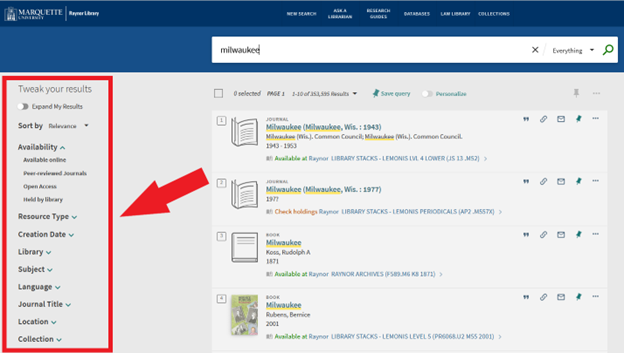
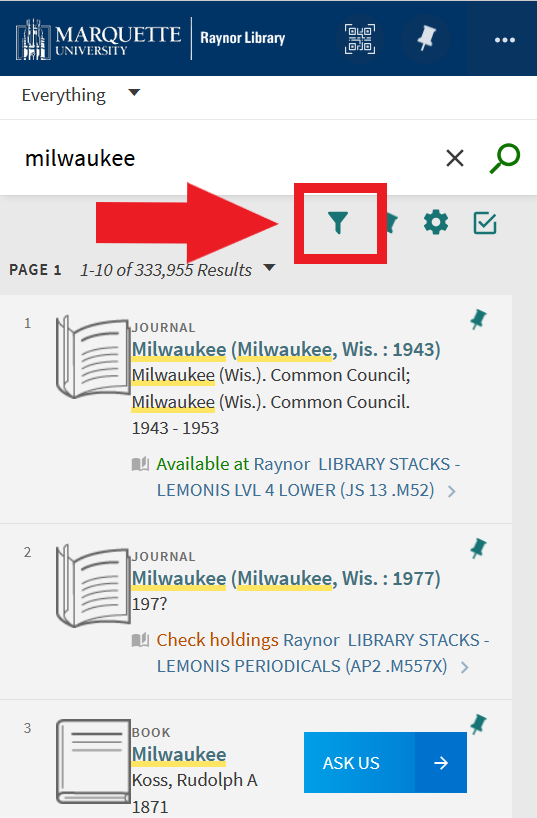
In Library Search, you can search for a topic or title from the main search bar, then locate the “Tweak your results” section.

Under “Tweak your results," select “Resource Type” then “Articles.”

Under “Availability,” select “Peer-reviewed Journals” for articles published in peer-reviewed journals.

Browse search results for relevant articles.


Desktop View

find articles

Mobile View

find articles

Article, articles, Search, Explorative Search, Information Retrieval, Peer-review, Scholarly Sources, Document Retrieval, Retrieval, Access, Library Catalog, Algorithmic Relevance, MARQCAT, Research Help, Finding Articles, Library Search
read more

Use whiteboards and borrow whiteboard markers

793 views   |   0 Vote this question as useful.   0 Vote this question as not useful.   |   Last updated on May 07, 2026    Patron Services

Portable whiteboards are available throughout the library on a first-come, first-served basis. Students can also check out dry-erase markers from the Library Services Desk on the first level of Raynor Library.

Office Supplies, Whiteboard, Markers, Library Services Desk, checkouts, borrow, borrowing, circulation, equipment, study spaces
read more

Foundations in Wisconsin (FIW) and the Funding Information Center (FIC)

775 views   |   0 Vote this question as useful.   0 Vote this question as not useful.   |   Last updated on May 07, 2026    Accessing Resources Policies

Raynor Library ceased producing Foundations in Wisconsin Online on December 31, 2023. We are partnering with CharityEZ to continue providing access to a national foundation search tool.

You can still access the online directory of Foundations in Wisconsin, which has access to publications until 2020.

Please note that Raynor Library will no longer subscribe to Candid, effective December 31, 2024.

FIC, FIW, CharityEZ, Non-Profit, Not For Profit, Funding, Grants, Public Access, Visitor's Hours
read more

Borrow skeleton and anatomy models

Anatomical skeletons and muscle models are available to borrow at the Library Services Desk, located on the first level of Raynor Library. You can use the skeletons and models throughout the library but cannot remove them from the building. They are loanable for 2 hours. When finished, return the models to the Library Services Desk. 

We also offer Anatomy.tv, which visualizes human anatomy systems in 3D and allows you to explore them with a mouse or touch screen.  

During certain times of the semester, the models are in high demand. To provide more students with the opportunity to study with them, usage of the models will be limited to a dedicated space near the Library Services Desk. Keep an eye on the library’s website for specific dates that these Pop-Up Anatomy Labs take place.

anatomical models, anatomy models, skeleton models, skeletal models, borrow, borrowing, circulation, checkouts, Library Services Desk, anatomy, biology
read more

Access articles off-campus

Only individuals with Marquette University credentials can access the library’s resources off-campus. The majority of the library's resources can be accessed using your MU credentials (via OpenAthens). For more details about logging in, see our Off Campus Access page.


NOTE: Alumni and guests must be on campus and connected to Marquette Wi-Fi to access articles. 


VPN

For some select resources, you may need to be connected to the Marquette VPN to access the library’s resources off-campus. 

The VPN connects students, faculty, and staff to campus-restricted resources. To access the VPN, you must use multi-factor authentication (MFA). MFA enhances the security of your Marquette account by using a secondary device to verify your identity. Marquette University uses Microsoft Authenticator for MFA.

Follow the directions on this page to get started with Microsoft Authenticator.   

To log in to Marquette VPN, follow this link: https://vpn.mu.edu/. Use your Marquette University credentials when prompted. 

Proceed to access the article(s) from the library from the A-Z Database List or from Library Search.

VPN, Off-Campus, Articles, Library Catalog, Library Search, databases, off-campus access, Document Retrieval, Duo, Access
read more

Find the restrooms

763 views   |   0 Vote this question as useful.   0 Vote this question as not useful.   |   Last updated on May 14, 2026    Directions

Restrooms are located on every floor of Raynor Library and the Lemonis Book Stacks/Lemonis Center for Student Success. Please view our floor plans for precise restroom locations.  

Restrooms, Directions, Bathrooms, Library Map
read more

Find and search news databases

755 views   |   0 Vote this question as useful.   0 Vote this question as not useful.   |   Last updated on May 07, 2026    Accessing Resources MARQCAT

A full list of news databases that Marquette subscribes to is available here.  

You can search directly within a news database.  

OR 

Use the Library Search “Search Newspapers” functionality. 

NOTE: The library may only have access to the text of certain news and magazine articles and not accompanying photographs. 

New York Times, Subscription, Database, Library Catalog, The Atlantic, National Geographic, Library Search, MARQCAT, databases, newspapers, news
read more

Search for a specific journal

744 views   |   0 Vote this question as useful.   0 Vote this question as not useful.   |   Last updated on May 08, 2026    Accessing Resources MARQCAT

In Library Search, you can search for a specific journal title in the main search bar.  

Select “Tweak your results.” Under “Resource Type,” select “Journals.”  

Determine if the library has access to the journal. If the library has online access, you can select Available Online. Under Online Access, select the option that includes the date range you need. 

If the library has physical copies, a call number and location will be provided. Select "Map It" to get directions to the item.

Journal, Information Retrieval, Explorative Search, Library Catalog, Library Search, MARQCAT, Scholarly Source, Access
read more

Search for a specific book

743 views   |   0 Vote this question as useful.   0 Vote this question as not useful.   |   Last updated on May 08, 2026    Accessing Resources MARQCAT

In Library Search, you can access the advanced search on the right side of the main search bar.

Next to “Search for,” select “Library Catalog.” Then change the search filters drop-down menu from “Any field” to “Title” and/or “Author/Creator.” 

Type the book’s title and/or author into the “Enter a search term” field.  

Known-Item Search, books, Document Retrieval, Book, Library Catalog, Library Search, MARQCAT, Title, Author, Advanced Search, ILL, Interlibrary Loan
read more

Borrow a charger for a phone, laptop, or tablet

742 views   |   0 Vote this question as useful.   0 Vote this question as not useful.   |   Last updated on May 08, 2026    Library Technology Patron Services

Raynor Library offers a variety of chargers that can be checked out. Chargers are available at the Library Services Desk located on the first level of Raynor Library.

The library offers chargers and adapter for laptops, phones, and more. These include:

  • Apple Magsafe/Apple Magsafe 2
  • USB-C chargers
  • Lightning (iPhone) Chargers
  • Mini-USB
  • Micro-USB
  • HDMI Cables
  • Ethernet
  • Microsoft Surface chargers
  • USB-C to HDMI adapters
  • USB-C to VGA adapters
  • and more

Consult our Circulating Equipment collection page for additional information. 

Charger, chargers, equipment, technology, Phone, Laptop, Computer, Cellphone, Mobile Phone, Checkouts, borrow, borrowing, circulation, Library Services Desk, Electronic Devices, iPhone
read more

Pick up items on hold

Patrons who request an item be placed on hold can pick it up from the bookcase next to the Library Service Desk on the first level of Raynor Library. NOTE: Patrons still need to check out the item.

Library Services Desk, circulation, borrowing, checkouts, holds, hold, hold requests, books
read more

Request a digital scholarship consultation

717 views   |   0 Vote this question as useful.   0 Vote this question as not useful.   |   Last updated on Dec 04, 2024    Research Help

Digital Scholarship consultations are available to students, faculty, and staff on various topics, including data visualization, research data management, copyright, digital media, digital storytelling, visual communication, web design/development, and more.

Please complete this form to request a digital scholarship consultation.

Digital Scholarship, Consultations, Data Visualization, Digital Media, Data Management, Data Collection, Visual Communication, Web Design, Web Development
read more

Touring Raynor Library

716 views   |   0 Vote this question as useful.   0 Vote this question as not useful.   |   Last updated on Nov 22, 2024    Policies

Tours of Raynor Library occur regularly and are limited to the library's public areas.

Public Access, Visitors, New Students, Prospective Students, Guests, Tours
read more

back to top